

UA-UC Reporting
Report Unsafe Acts & Unsafe Conditions
Before They Escalate
Using THZ-Safety, digitalize reporting of Unsafe Act and Unsafe Conditions across your plants. Reporting UA-UC and taking corrective actions in-time has the potential to avoid catastrophic events thus making the workplace much safer. Here are the features of UA-UC Reporting in THZ-Safety platform.
Step 1
Capture UA-UC Observation Details
Fill in comprehensive info of the observation with granular details — location, category, severity, and description.
Upload photos or videos as visual references to document exactly what was observed on the ground.

Step 2
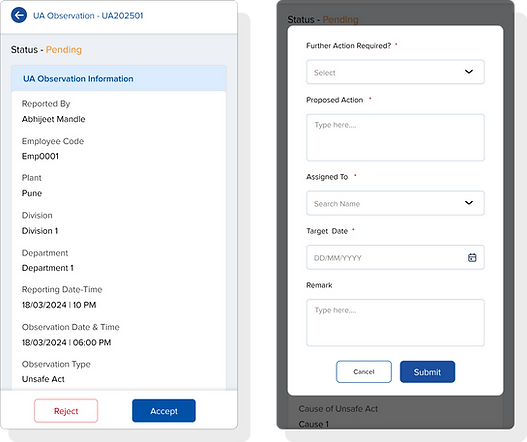
Review for Acceptance
UA-UC observations are automatically sent to the concerned Department's HOD and Safety Coordinator for review.
They can examine all observation details and make an informed decision to accept or reject the report.
Step 3
Assign Responsibility for Corrective Action
For accepted observations, assign clear accountability to the right person or team to make things right.
Set automated reminders so that corrective action closures never slip through the cracks.


Step 4
Submit Corrective Action Details & Evidence
Enable the responsible person to log full details of corrective actions performed with timestamps and notes.
Supporting evidence — photos, documents, inspection reports — can be uploaded directly into the system.
Step 5
Review Corrective Action Taken, Verify & Close
HOD and Safety Coordinator are automatically notified when corrective actions are submitted for review.
Review the submitted information, verify its adequacy, and officially close the UA-UC observation.


Step 6
UA-UC Dashboard
Get a real-time dashboard generated automatically as observations are reported across your plants.
Filter data by days, months, quarters, or years to analyze trends over any time period.
Visualize data through bar graphs and pie charts for clear, actionable insights.
Export data to Excel reports for the required date range — audit-ready in one click.


